The ACA Marketplace provides a lot of plan options for you to sift through. To make life easier, Lucie offers a bunch of filtering options to help you narrow your search to just the right plans for your clients.
On the left of your page in the quoting exchange, you’ll see a menu of filtering options. You can filter by maximum premium, deductible, out-of-pocket limits, plan types, carriers, and more.
Many brokers start filtering plans by provider and prescription. This ensures that the plans you recommend are accepted by your client’s current medical providers and cover the prescriptions they need.
Filter by provider
In the menu on the left of the page, scroll to the Preferred Provider section and click Add providers. A pop-up will appear with a search bar, where you can type in your client’s providers. You can select multiple providers and then hit Apply.
In each plan card, you’ll see the providers you selected. If the provider is in-network, the name will appear in green. If the provider is out-of-network, it will appear in red.
You can also use the checkboxes next to a specific provider in the left-hand menu, which will update the plan cards to only show plans that have the selected provider in-network.

Filter by prescription
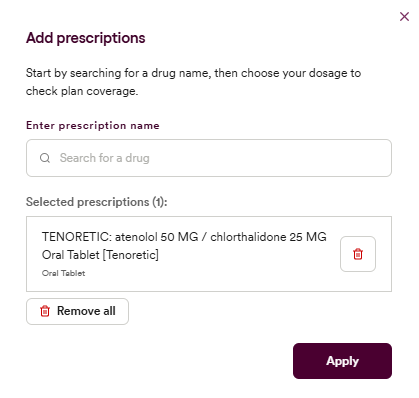
Similarly, on the left side menu, you will find the Medications section. If you click on Add prescriptions, a new pop-up will appear where you can search by your client’s prescriptions. You can select medications, enter the dosage, and hit Save. Like filtering by providers, each plan card will show whether or not the medication is covered by the plan.
Need a hand? If you hit a hurdle along the way, we're here to help — just submit a ticket here.